This is a running list of all of the new features, capabilities, and tools in Productable
(last updated April 10, 2026)
2026
 Increased Visibility of Maturation
Decision criteria comments now drive activity posts to help focus attention to project maturation as it happens.
✏ Blueprint Output Updates
We’ve streamlined and improved our blueprint windows to now include markdown. This foundational improvement will further aid with data awareness and utilization by leaders and integrators.
 Independent Field Custom Fields
Project fields can now be displayed as independent cards on the Project Overview page. When a field is marked for “independent” presentation, it appears in its own box with the field name, value, and last updated details. This layout makes it easier to quickly scan and focus on the most important information at a glance.
 Field Roll-ups in Projects Table
You can now send feedback directly from the roll-ups view when reviewing a field across projects. Use the new “Send Feedback” option to quickly message relevant team members, prompting updates or sharing input. Feedback activity is tracked with a timestamp, helping teams maintain visibility and follow-through on key fields.
2025
 Portfolio Templates
When a Portfolio Owner needs to create a new Portfolio, they can now choose from one of several templates to automatically set up their Portfolio with relevant Stages and Decision Criteria. Whether you need a Continuous Process Improvement, SBIR Portfolio, or Innovation Portfolio, Portfolio Templates can get you started and save you time.
Do you need a custom Portfolio Template that you don't see? Let us know more about it here.
 Nudges
Waiting for a Progress Update from a Project team?
Nudge them for an update, and they will receive a notification prompting them to let you know what's been going on. Check out how to "Nudge" teammates in this short, guided tutorial 
⭐ Favorites
When a Project is moved to a different Portfolio, you can now see a historical log of its previous Portfolio Stage Report progress. This ensures that all data is preserved when Projects are migrated between Portfolios. To find, click on the dotted menu at the top right corner of the Project page.
Check out how to "Favorite" entities in this short, guided tutorial
✏ Past Portfolio Stage Report
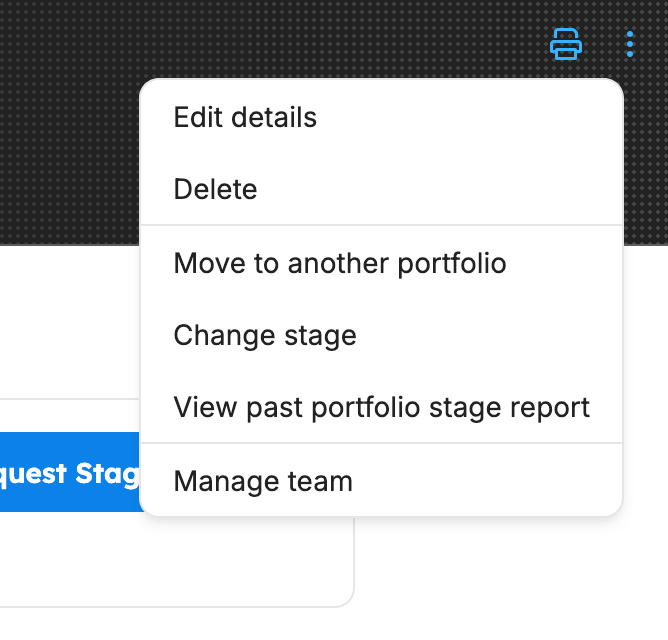
When a Project is moved to a different Portfolio, you can now see a historical log of its previous Portfolio Stage Report progress. This ensures that all data is preserved when Projects are migrated between Portfolios. To find, click on the dotted menu at the top right corner of the Project page.
✏ Portfolio Carousel on Collections Dashboard
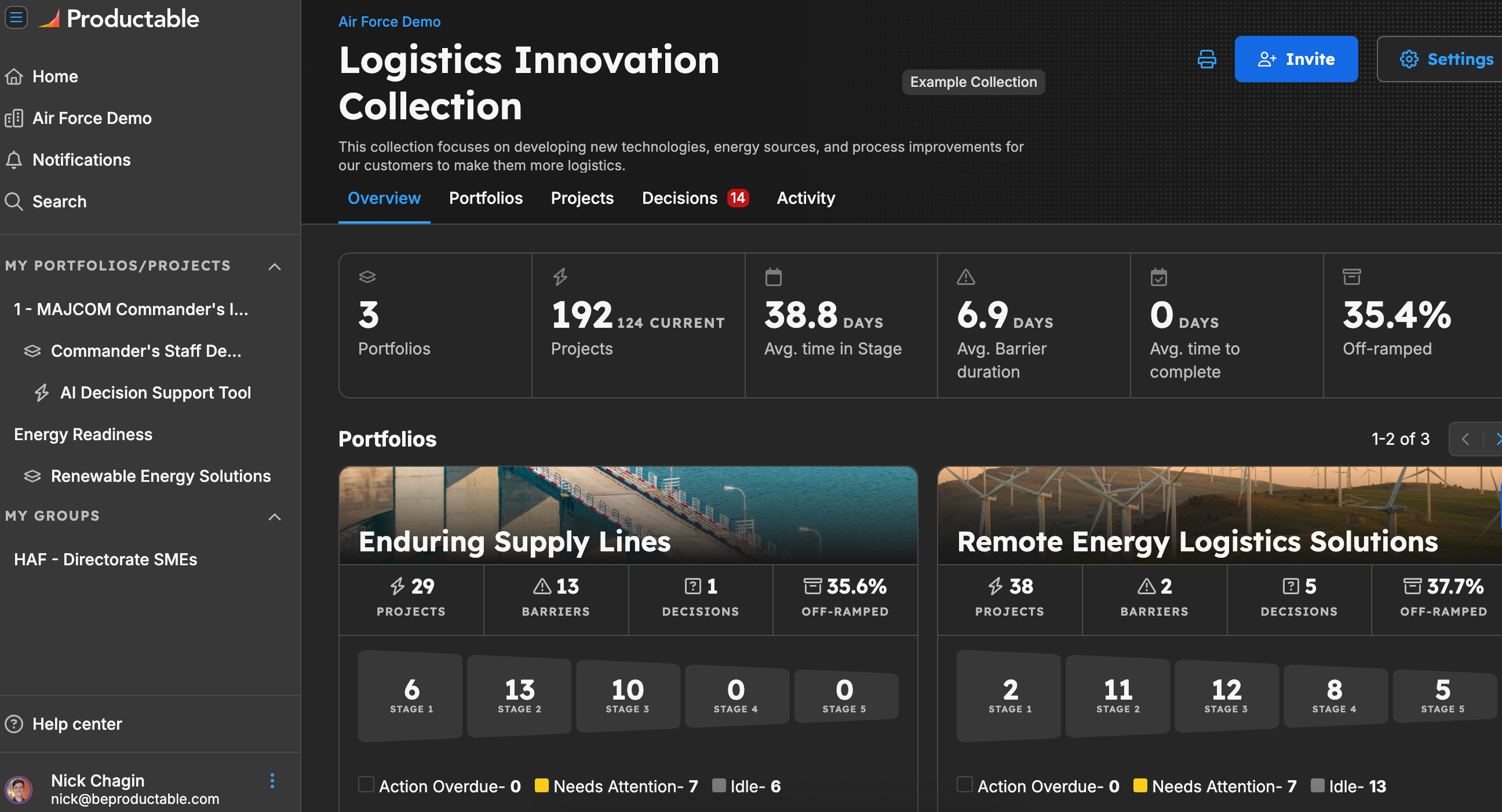
Find a new display of the Portfolios within your Collection, communicating the number of projects, active barriers, pending decisions, and off-ramp percentage in each Portfolio. For an extra sizzle, add a thumbnail to the Portfolio in the Portfolio settings.
 Collections
Organize your portfolios to match exactly how your organization is hierarchically organized. Collections are hubs that hold nested Collections or Portfolios. This will allow for maximum flexibility as you set up your organization's innovation operation within the broader innovation ecosystem.
 Groups
Need to see a cohort of individuals so you can track all of their projects instead of tracking projects by portfolio? Create a Group! Groups allow you to add other users in Productable into a group so that tracking their projects' progress is easier than ever.
 Reorder Decision Criteria
Collection and Portfolio Owners can now reorder Decision Criteria in their Stage settings so that the Stage report on a Project page fits their process.
2024
✏ Decision Criteria updates
Organization, Collection, and Portfolio Owners can all edit Decision Criteria within a Portfolio whenever they would like. Owners should note that once they change the Decision Criteria within a Portfolio, only all future new Projects will display the updated Decision Criteria.
Legacy Projects will continue displaying previous Decision Criteria to ensure accurate data reporting.
 Project data CSV export
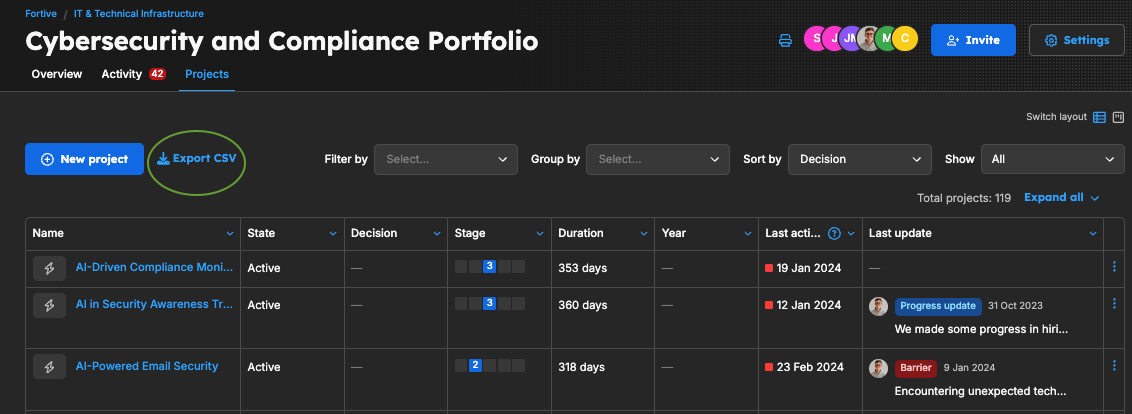
All users can export all Project data within a Portfolio to a CSV that includes project names, descriptions, stages of maturity, and lead team members.
 Expanded Custom Fields capabilities
Org Owners and Collection/Portfolio Owners: Productable has expanded the capability of Custom Fields to tailor data within Productable to fit the unique data needs of your orgnanization, collection, or portfolio. Watch this tutorial to learn how
With Custom Fields, you can:
- Adapt to Your Needs: Design fields that align with your team's specific criteria, ensuring that the data you collect is relevant and actionable.
- Enhance Data Management: Include custom data points that reflect your organizational priorities, making it easier to manage and report on innovation progress.
- Streamline Insights: Capture and categorize information in a way that best supports decision-making and aligns with your innovation strategies.
New Portfolio stats
Now you will find more detailed metrics reflecting the health and performance of a Portfolio.
"Project page" changed to "Overview" tab
On the Project page, "Project" details tab will now be named "Overview" which is inline with the Portfolio and Sub-portfolio pages. And when you land on the Project page, it will default to the "Overview" tab.
 Decision Criteria hyperlinks
When Org Owners or Portfolio Owners create Stages and Decision Criteria, they can hyperlink helpful resources or tools to assist Project Members with achieving the Decision Criteria [demo to come].
 Org Owner role
Portfolio Owners can now take on the role of Org Owner, giving them permissions to approve org access requests and nearly all organizational customization capabilities in Productable.
 User account provisioning
When interested individuals request a Productable account, Org Owners can manage those requests and authorize or deny an account. This will expedite the process of adding new team members.
 Account requests
Now any IL4 user can request a Productable account in the app. Once an account request has been made, organization admins can take one of three actions: (1) approve and add a user role, (2) approve without a role, or (3) deny.
Onboarding nudges
Now sub-portfolio owners will receive helpful email nudges when it’s time to take steps like adding team members, requesting project updates, resolving barriers, and making project decisions.
✅ Custom field improvements
We’ve refreshed the custom field UI with new field type groupings, a space-saving layout, and optional color settings for a smoother experience.
⚡ Activity feed enhancements
Now, in addition to barriers, wins, progress updates, and insights, you can check your activity feed for new stage change requests, off-ramp requests, and project movement requests.
 Third-party status site
We’ve set up a Productable status site at https://productable.instatus.com/. Subscribe to stay informed about incidents, outages, and scheduled maintenance.
 Insights
Now, in addition to Barriers, Wins, and Progress Updates, you can post Insights to your Project activity feed. Keep leaders and collaborators informed about what you learn as you advance your Project.
 Project and portfolio images
Now you can personalize any Project or Portfolio in Productable by setting a thumbnail image. Choose from a gallery of default images or upload your own!
 Project list improvements
We’ve enhanced the project list view with custom field filters and skimmable indicators of project status and state, making it easier to know what’s happening across your portfolio. Visit any portfolio and click the Projects tab to see what’s new.
⬆ Bulk import improvements
We’ve added a “Resolution States” field to the bulk import modal so you can easily indicate which projects have already been off-ramped, completed, or terminated. You can also create custom fields for multiple projects at once by adding those fields as column headers in a CSV upload.
 Project field history
Now any time someone makes changes to a project’s fields, those updates will appear in the Activity feed for that project, making it easier for teams to track and contextualize project data over time.
Improved portfolio visualization
We’ve updated the portfolio page to more clearly showcase the number of projects in each stage of development. See where projects are stalled so you can take action on what matters most.
Nudge project members
Now you can request a status update on a project in one click. Visit the projects tab of any portfolio in Productable, navigate to the Last Update column, and click “Send nudge” to remind the members of a specific project to share their progress.
⏳ Stage duration
We’ve added a “Duration” column to the project list view in Productable so you can easily see how many days projects have spent in their current stage. If you’ve set an expected duration for a stage, you will see actual/expected duration in the projects table. If a project exceeds its expected stage duration, sub-portfolio owners and project members will get an automatic notification so everyone stays on track.
2023
Project and portfolio images
Now you can personalize any project or portfolio by setting a thumbnail image.
Choose from a gallery of default images or upload your own!
Project list improvements
We’ve enhanced the project list view with skimmable indicators of project status and state, making it easier to know what’s happening across your portfolio at a glance. Visit any portfolio and click the Projects tab to see what’s new.
⬆ Bulk import improvements
We’ve added a Resolution States field to bulk imports so you can easily indicate which projects have already been off-ramped, completed, or terminated. You can also create custom fields for multiple projects at once by adding those fields as column headers in a CSV upload.
Project field history
Now any time someone makes changes to a project’s fields, those updates will appear in the Activity screen for that project. This will make it easier to track and contextualize project data over time.
Improved portfolio visualization
We’ve updated the portfolio page to more clearly showcase the number of projects in each stage. Easily see where projects are stalled so you can take action on what matters most.
Nudge project members
Now you can request updates on any project in one click. Visit the projects tab of any portfolio, navigate to the Last Update column, and click “Send nudge” to remind project members to share their progress.
⏳Stage duration
We’ve added a Duration column to the projects table so you can easily see how many days projects have spent in their current stage. If you’ve set an expected duration for a stage, you will see actual/expected duration in the projects table. We also send a notification to sub-portfolio owners and project members when a project exceeds its expected stage duration.
 Custom fields
Now org admins can create and manage custom fields for portfolios, sub-portfolios, and projects. To access your field settings, click the gear icon in the upper right corner of Productable. When you create a new field, you can customize the name, description, and field type to make it even easier to capture the data you need and stay on track.
➕ Bulk project creation
You can now add multiple projects to Productable at the same time from within the app. Create a new project, click “Bulk Add Projects,” and fill in the name, description, stage, and start date for each one. Save time by clicking “Import CSV” to upload as many new projects as you want at once.
 Feature renaming
To create a more intuitive experience, we’ve made the following changes to feature names in Productable: Ecosystems are now Portfolios, Portfolios are now sub portfolios, and Innovations are now Projects. This has not affected the functionality of these features in any way.
 Progress updates
Sometimes you need to let leaders and collaborators know what you’ve been working on without reporting barriers or wins. That’s where progress updates come in. Visit any project in Productable, click “New post,” and select “Progress update” to easily share the latest project news with your team.
 Project movement
We’ve made portfolios in Productable even more flexible. Org admins can now move projects between portfolios to revise their existing project or portfolio setup, to better reflect a project’s evolution over time, or to align with organizational changes.
✉ Multi-invite
Now you can invite multiple people to your Productable workspace at once by visiting your member settings, clicking “Invite people,” and entering their email addresses separated by commas or newlines.
↩ Undo option for org admins
Let’s say a portfolio owner mistakenly marks an innovation project as complete or off-ramped. Now, admins can reverse those actions by visiting any completed or off-ramped innovation project, navigating to the top right menu, and selecting “Undo completing innovation” or “Undo off-ramping innovation.”
⚙ New settings UI
Ecosystem owners can now create and update stages and decision criteria at the ecosystem level. To make changes to your settings, click the gear icon at the top right of the ecosystem or portfolio page.
 Custom portfolio role labels
We previously had custom labels for project owners and collaborators. Now you can set custom role labels for portfolio and ecosystem owners.
Portfolio page redesign
Review portfolio performance at a glance with simple pipeline stage metrics, red/yellow/green status indicators, and more.
 In-app notifications
You now will get alerts about new comments, mentions, stage changes, and more directly in your Productable workspace so you can quickly take action on what matters most.
 Blueprints (beta)
Empower confident problem solving across your organization with digital workbooks designed to help innovators advance their projects. To get started, visit an innovation project in Productable and click “Get started” next to any of the Stage Report questions.
Draft mode
Now you can save your answers to stage report questions as drafts. When you’re ready to share your responses with decision-makers, click “Publish.”
 Add innovation members in fewer clicks
When you create a new innovation, a modal will automatically pop up, making it easy to add team members without having to open your innovation settings.
 Platform One email matching
If you attempt to log into Productable and do not yet have an account, we will display your Platform One login email so you can more easily request access to the platform.
 Barrier filters
Organize Barriers by “Theme,” “Importance,” “Resolved,” or “Unresolved” to easily prioritize your efforts and provide the right support at the right time.
Role labels
Now you can create custom role labels outside of the default “Innovation Member” and “Innovation Collaborator” options to further clarify who owns what. You can even designate multiple people as team leads to match how your team operates.
❌ Confidence scores removal
We’ve removed confidence scores from the stage report page in Productable. Why? We’re in the process of designing blueprints that will help innovators test the validity of new ideas, without the need for manual scoring. Stay tuned for more information!
Portfolio pipeline chart
View all of the projects across the portfolio, including metrics such as: number of projects are currently in the stage (and % of the entire portfolio), number of innovations that have passed to the next stage of maturity, and number of innovations that have been off-ramped and have completed
⏱ Portfolio stage duration chart
Visualize the average amount of days innovations are spending in each stage of maturity, helping identify patterns in where projects are getting stalled
Portfolio dashboard metrics
# of innovations, % off-ramped, average time in stage, average barrier duration
 Profile photo upload
Upload an image of your beautiful face to your profile by clicking on your initials in the lower left corner of the platform.
 Portfolio kanban view
Manage your pipeline at a glance with the new kanban layout. Visit any portfolio and, under the innovations tab, select the kanban icon next to “Switch layout” to see all the innovation projects arranged by stage.
 Portfolio funding
Get a snapshot of innovation resourcing information with the new portfolio funding widget. See how much money you’ve allocated in the current fiscal year and how much is still available for further investments.
Portfolio outcomes
Keep your innovation goals front and center with the new portfolio outcomes widget. Customize how you will measure progress, set a target completion date, and compare current vs. target metrics at any time.
 Universal dark mode
Notice that new toggle in the upper right corner of Productable? Use it to turn dark mode on or off anytime, without having to change your system setting
 Smooth search UI
Find specific innovations, portfolios, ecosystems, and users in Productable in seconds. Simply click “Search” in the left navigation (or hit Ctrl/Cmd + K) to open a search modal and enter the name of what you’re looking for.
 @Mentions
Requesting a stage change for your innovation project or submitting a stage change decision? Tag other users in the “Details” field, and Productable will notify them automatically—so nothing slips through the cracks.
 Magic Link log-in (for corporate users)
Forget your password? No problem! Password-less authentication, also known as magic link login, is a method of verifying a user’s identity without requiring a password. When you want to log in, enter your email address on the sign-in page. Productable will then send a unique, short-lived link over email. Click on that link in your email and this will automatically log you into Productable, bypassing the need for a password.
✏ Comment on Decision Criteria
You can now have collaborative discussions within any particular Decision Criteria on your project page so you and your team can make progress faster! By default, you will receive email notifications when a new comment happens on a project you are assigned to (as an Innovation Member or Innovation Collaborate). Turn off notifications by clicking on the menu in the bottom left corner next to your name.
Book a Blueprint session with Productable experts!
Getting stuck working through a particular Decision Criteria? Book a live working session with Productable’s methodology experts to get the data you need to progress your innovation. You even get a snazzy slide to upload to Productable after your session! Just click on the “Schedule Analysis” button to find a date/time that works best for you.
File uploads
You can now attach files to Innovation details, Decision Criteria updates, Barriers, and Stage Change Requests so that your colleagues have contextual transparency into your progress!
About file uploads:
- File size limit is 4mb
- Max file count is 5 (per item)
- Max filename length is 255 characters
- Files with the following extensions are not allowed: .bat, .com, .dll, .exe, .msi, .csh, .sh, .apk, .cab
Was this article helpful?
That’s Great!
Thank you for your feedback
Sorry! We couldn't be helpful
Thank you for your feedback
Feedback sent
We appreciate your effort and will try to fix the article